Intention web design
  • 0 Shopping Cart
  • Home
  • Store
    • Browse All
    • Green Hosting
    • Misc
    • Maintenance
    • Quick Start websites
  • Announcements
  • Knowledgebase
  • Network Status
  • Contact Us
  • More
  • Account
    • Login
    • Forgot Password?
  1. Portal Home
  2. Knowledgebase
  3. Email
  4. How do I create an email forwarder?

  Categories

Advanced
4
Billing
5
cPanel
4
Databases
9
Domains
11
Editing Your Website
5
Email
14
FAQ
2
Files
4
FTP
4
Hosting
4
Installation Guides
1
Logs
1
Maintenance
4
Marketing/SEO
7
Preferences
4
Safety and Security
3
Security
4
Tools and Resources
4
Transfers
3
Troubleshooting
10

  Categories

  Support

My Support Tickets
Announcements
Knowledgebase
Downloads
Network Status
Open Ticket

How do I create an email forwarder? Print

  • 0

  1. Login to cPanel.
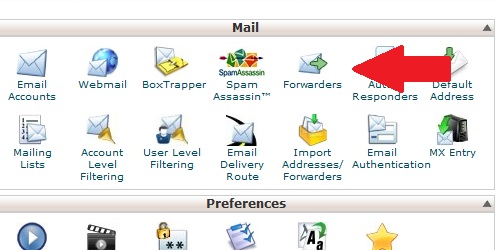
  2. Locate and click on the "Forwarders" icon within the "Mail" category.
  3. Open the Forwarder page from within cPanel.
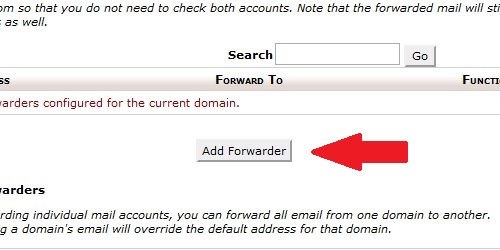
  4. Click on the "Add Forwarder" button.
  5. Click the Add Forwarder button.
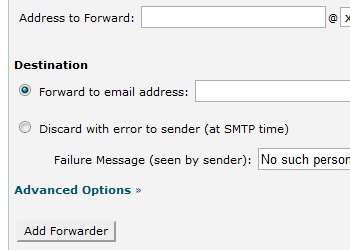
  6. Enter the configuration you desire for the forwarder.
  7. Configure the Forwarder account.
  8. Click the "Add Forwarder" button.

Was this answer helpful?

Related Articles

Managing Your Mailbox We will set up your mailboxes and provide you with the details to set up your account. Many web... Setting Up Your Email Programs While we are happy to set up your email addresses on our server and provide all the details for... How do I create an email account in cPanel? Login to cPanel. Locate and click on the "Email Accounts" icon within the "Mail" category.... How do I setup my email in Microsoft Outlook 2010? Open Outlook 2010. Go to File -> Info -> Add Account. Select the "Manually configure server... How do I configure my Default Address? Login to cPanel. Locate and click on the "Default Address" icon within the "Mail" category....
« Back

Powered by WHMCompleteSolution

  Support

My Support Tickets
Announcements
Knowledgebase
Downloads
Network Status
Open Ticket
  • Contact Us
  • Terms of Service

Copyright © 2026 Intention web design. All Rights Reserved.


Loading...
Loading...

Choose Currency

£ GBP
$ USD
EUR

Generate Password

Please enter a number between 8 and 64 for the password length