Intention web design
  • 0 Shopping Cart
  • Home
  • Store
    • Browse All
    • Green Hosting
    • Misc
    • Maintenance
    • Quick Start websites
  • Announcements
  • Knowledgebase
  • Network Status
  • Contact Us
  • More
  • Account
    • Login
    • Forgot Password?
  1. Portal Home
  2. Knowledgebase
  3. Domains
  4. How do I create a redirect?

  Categories

Advanced
4
Billing
5
cPanel
4
Databases
9
Domains
11
Editing Your Website
5
Email
14
FAQ
2
Files
4
FTP
4
Hosting
4
Installation Guides
1
Logs
1
Maintenance
4
Marketing/SEO
7
Preferences
4
Safety and Security
3
Security
4
Tools and Resources
4
Transfers
3
Troubleshooting
10

  Categories

  Support

My Support Tickets
Announcements
Knowledgebase
Downloads
Network Status
Open Ticket

How do I create a redirect? Print

  • 0

  1. Login to cPanel.
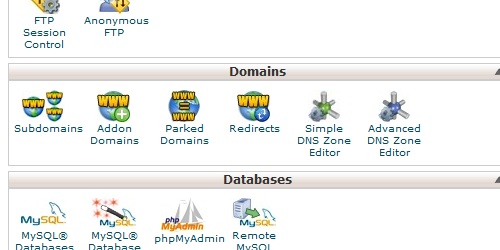
  2. Locate and click on the "Redirects" icon under the "Domains" category.
  3. Open the Redirects page in cPanel.
  4. Enter the URL you want to redirect from, and then the URL you want to redirect to.
  5. Enter the required information for the redirect.
  6. Click on the "Add" button to create the redirect.

Was this answer helpful?

Related Articles

What is a domain? A domain is a human-readable name assigned to an IP address to make accessing websites much... What is a subdomain? A subdomain is a subsection of a main domain, in this format: subdomain.maindomain.com... How do I create a subdomain? Login to cPanel. Locate and click on the "Subdomains" icon under the "Domains" category.... What is a redirect? A domain redirect is an instance where a visitor is redirected to a different page when they try... What is an addon domain? An addon domain is a domain that can be added to an existing hosting account and exist as its own...
« Back

Powered by WHMCompleteSolution

  Support

My Support Tickets
Announcements
Knowledgebase
Downloads
Network Status
Open Ticket
  • Contact Us
  • Terms of Service

Copyright © 2026 Intention web design. All Rights Reserved.


Loading...
Loading...

Choose Currency

£ GBP
$ USD
EUR

Generate Password

Please enter a number between 8 and 64 for the password length